Quick Change: The Font That Elevates Your Brand
The Power of a Great Font in Branding
As a small business owner, you know that every detail matters. From your logo to your packaging, the visual elements you choose help shape how your brand is perceived. One often-overlooked element is the font you use. A well-chosen font can make your brand look more professional, consistent, and trustworthy. Quick Change is a script font that brings energy, personality, and charm to your brand materials—without sacrificing readability or professionalism.
What Is Quick Change?
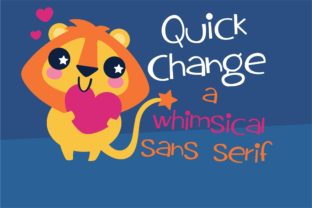
Quick Change is a beautiful script typeface with a quirky, bouncy style that feels both modern and timeless. Its flowing lines and playful curves give it a handcrafted feel, making it perfect for brands that want to stand out with a touch of creativity. It’s not just a font—it’s a design asset that can elevate your brand identity across multiple platforms.
Whether you’re designing a logo, creating social media graphics, or printing product labels, Quick Change adds a unique flair that catches the eye while still maintaining a sense of elegance. It’s ideal for businesses that want to convey warmth, approachability, and a bit of fun without being too childish or overly formal.
Where to Use Quick Change in Your Business
One of the best things about Quick Change is its versatility. It works well in a variety of settings, from digital to print. Here are some real-world examples of how you can incorporate it into your branding:
- Logo Design: Use Quick Change as your primary font for a logo that feels personal and memorable. It’s especially effective for boutique owners, café brands, and creative studios.
- Product Labels: Handmade candle makers, soap artisans, and small-batch food producers can use Quick Change on their product labels to add a stylish, artisanal touch.
- Website Banners: For online shops or service providers, Quick Change can be used in headlines or call-to-action buttons to draw attention and create visual interest.
- Social Media Graphics: Instagram posts, Pinterest pins, and Facebook banners can benefit from the playful yet professional look of Quick Change.
- Menus and Packaging: Restaurants, bakeries, and cafes can use this font on menus, signage, and packaging to create a cohesive brand aesthetic.
- Thank-You Cards and Stickers: Quick Change adds a personal, handwritten feel to thank-you cards, custom stickers, and promotional materials.
By using Quick Change consistently across your brand materials, you’ll create a strong visual identity that customers will recognize and remember.
When to Use Quick Change: Headline vs. Body Text
While Quick Change is visually appealing, it’s important to consider when and where to use it. As a display font, it works best for headlines, logos, and short text elements like taglines or social media captions. For longer body text, such as website content or product descriptions, it’s better to pair Quick Change with a clean, readable sans serif font.
For example, a handwritten font like Quick Change paired with a modern sans serif font like Helvetica or Montserrat creates a balanced, professional look. This combination is perfect for branding materials that need to be both eye-catching and easy to read.
Readability Matters in Real-World Settings
As a small business owner, you want your brand to look great in every context. Quick Change is designed to be legible even at smaller sizes, making it suitable for product labels, QR codes, and mobile screens. However, it’s always a good idea to test your fonts in different environments before committing them to your brand assets.
Printed packaging, social media thumbnails, and web banners all require different considerations. Make sure your chosen font looks good in both color and black-and-white formats. Also, check that it remains clear and readable when printed in small sizes or viewed on high-resolution screens.
Font Pairing Tips for Better Branding
Pairing Quick Change with the right complementary font can enhance your brand’s visual appeal. Here are a few simple pairing ideas:
- Quick Change + Sans Serif: A decorative script like Quick Change paired with a clean sans serif font creates a balance between creativity and professionalism.
- Quick Change + Serif: For a more elegant look, pair Quick Change with a classic serif font like Georgia or Cinzel.
- Quick Change + Modern Sans: If you want a fresh, contemporary feel, combine Quick Change with a modern sans serif like Futura or Lato.
These combinations allow you to maintain a cohesive brand identity while keeping your design versatile and adaptable.
Using Quick Change for Commercial Projects
Before using Quick Change for commercial projects, always check the font’s licensing terms. Whether you’re printing product labels, designing templates, or creating digital downloads, it’s essential to ensure you have the proper rights to use the font commercially.
Many premium fonts, including Quick Change, come with commercial licenses that allow you to use them for branding, marketing, and customer-facing materials. Always read the license agreement carefully to avoid any legal issues.
Conclusion
Choosing the right font is an important part of building a strong brand. Quick Change offers a unique blend of style and functionality that can help your business stand out in a competitive market. With its playful yet professional look, it’s the perfect choice for small business owners who want to create a cohesive, memorable brand identity.